


Ulta Beauty: Makeup & Skincare
4.647.04K Reviews
App Specs
- Version
- 10.17.1
- Updated On
- License
- Free
- Downloads
- 5,000,000+
- Developer
- Ulta Inc.
- Categories
- Beauty
- Platform
- Android, iOS
Screenshots

 Analysis by AppCompare
I tend to trust a beauty-shopping app most when it helps me make a considered choice rather than rushing me toward checkout. Ulta Beauty: Makeup & Skincare sits between a retailer’s catalog and a beauty reference shelf: it brings makeup, skincare, haircare, fragrance, and shopping tools together in one place. That focus is useful, but it also means the experience is naturally centered on browsing and buying from Ulta rather than surveying every brand or store on the market.
The app is free, developed by Ulta Inc., and has been available since 2012. It has a 4.6 average from around 198,000 ratings and over 5 million installs, which suggests it has become a familiar shopping tool for many beauty customers. Those figures don’t tell me whether a product will suit my skin or whether the app fits my habits, so I’d treat them as context, not a substitute for checking ingredients, shades, and purchase details yourself.
A retailer’s view of beauty, not a neutral directory
That distinction matters if you’re comparing products. The app is handy when you already shop at Ulta or want to explore what the retailer carries, but its recommendations and product discovery naturally operate within that retail environment. I wouldn’t use it as my only source for deciding whether a skincare ingredient is right for me, or as a complete comparison of what is available elsewhere. For those decisions, I’d use the app to shortlist options, then check the product information and my own needs before buying.
The app’s age rating is Everyone, and its current version is 10.7, with Android support beginning at OS 9. That can help you decide whether it is likely to fit your device and household, but it isn’t a guarantee that every feature behaves identically on every phone. If you’re installing it on an older device, I’d leave room for the possibility that performance or compatibility may differ from a newer one.
What I can judge—and what I would check
Shopping apps can involve account details, order information, saved preferences, and device access, so I prefer to inspect the choices in front of me rather than make assumptions. Before signing in or enabling anything, I’d look at the app’s current permission prompts and privacy information, and decide which choices are necessary for the way I plan to use it. I wouldn’t grant access just because a prompt appears; if I’m only browsing, I can pause and consider whether the request makes sense for that task.
The same care applies to saved products and shopping activity. A wishlist can make future browsing easier, but it also means keeping a record of things you may be considering. If that feels too personal, you can browse without treating the wishlist as essential and review any account or saved-item controls the app presents. I find it useful to separate “I want to remember this shade” from “I’m ready to buy it,” especially when I’m researching a product rather than shopping with a firm plan.
Discovering Beauty at Your Fingertips
The first thing that caught my eye about Ulta Beauty: Makeup & Skincare is its user-friendly interface. It’s super easy to navigate, and everything you need is just a tap away. Whether you’re hunting for the latest lipstick shade or trying to find that perfect skincare routine, this app has got you covered.
Worth Reading Before You Choose

EA SPORTS FC Mobile 26 Is a Bigger Football Game, but It Takes Time

Flipboard Shows What News Apps Must Do Beyond the Feed

Switching to Android Auto Means Rethinking Your Driving Routine

Google Calendar Makes a Crowded Week Easier to Manage

Ludo King Makes the Most of the Minutes Between Plans

Baby Panda World Brings Quick Play to Modern Phones, but Its Game Library Feels Busy
Searching for products is a breeze with their smart search feature, allowing you to filter through various categories like makeup, skincare, hair, and more. Plus, they’ve got a cool barcode scanner feature. Imagine being in-store, curious about a product, and just scanning to get all the deets. Pretty nifty, right?
Perks and More Perks
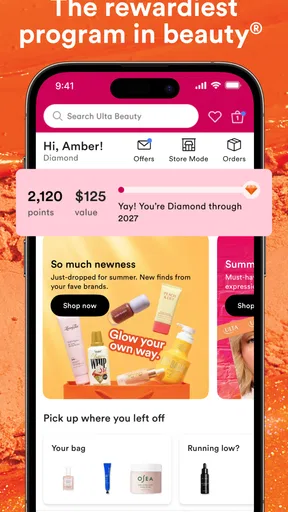
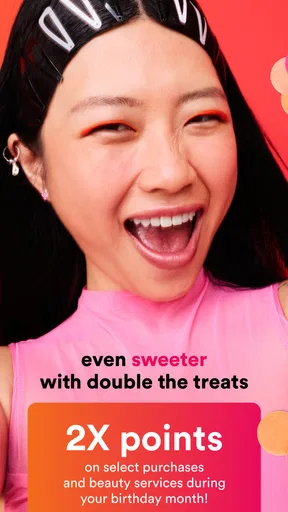
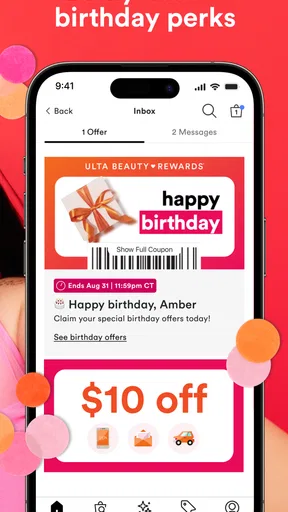
What’s better than shopping? Getting rewards for it! With the Ulta Rewards program integrated into the app, you earn points with every purchase, which can be redeemed for discounts on future buys. Who doesn’t love a good deal?
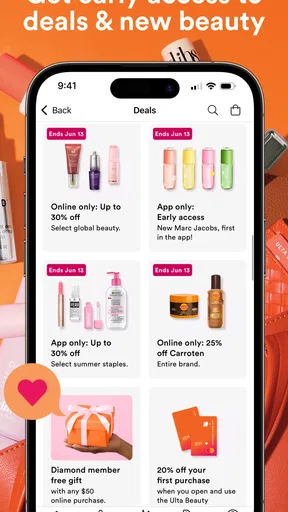
Another highlight is the app-exclusive offers. Seriously, they have some killer deals that you won’t find elsewhere. It’s like being part of a secret club where you get all the insider steals.
I’d treat offers as a reason to check the app, not as a reason to buy something I didn’t already want. Promotions can make a planned purchase feel more worthwhile, but they can also make it harder to stick to a list. A practical approach is to save the products you genuinely need first, then look at any offers and decide whether they change the value of that basket. That keeps discounts in perspective and makes the rewards feature more useful over time.
Beauty Tips and Tutorials
Not quite sure how to use that new contour kit? Don’t worry. The app features a slew of tutorials and videos to guide you through the latest trends and techniques. It’s like having a personal beauty consultant available 24/7. And the best part? They’re constantly updating the content to keep things fresh and exciting.
For me, tutorials are most useful when I approach them as a starting point rather than a promise that one technique works for everyone. I can watch a demonstration, note the order of steps or the type of tool being used, and then adapt it to what I already own. That’s especially helpful if I’m learning a makeup technique and don’t want to buy a full set of products before I know whether I’ll use them. Video guidance can show the process more clearly than a product description, though it can’t replace checking whether a formula or ingredient suits me.
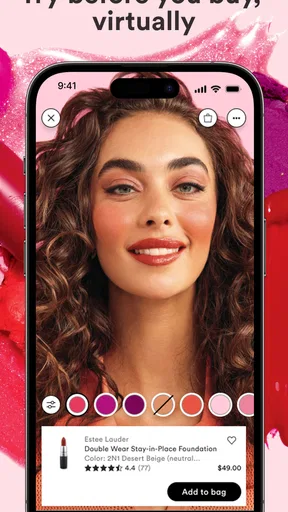
They even have a virtual try-on feature. Yep, you can try on that bold shade of lipstick virtually before making the plunge. It’s a great way to avoid any buyer’s remorse!
I’d use virtual try-on to narrow down a few possibilities, not to make the final call on an exact shade. Screen color, lighting, and how a product looks in person can differ, so the feature is best treated as a quick visual comparison. One useful workflow is to try a couple of shades, save the strongest candidates, and then look at their product details before choosing. That makes the tool a decision aid rather than a substitute for seeing the item in real life.
Your Beauty Wishlist
Keeping track of your favorites is super easy with the wishlist feature. You can save products you’re interested in, making it simple to find them later when you’re ready to purchase. It’s also perfect for dropping hints to friends and family for gift ideas.
I also like the wishlist as a way to slow down impulse shopping. If I’m browsing at night or comparing a new hair product with what I already use, I can save the item and come back later instead of treating curiosity as a reason to check out immediately. For a gift list, it can help me be specific about a preferred shade or product, though I’d still share only what I’m comfortable sharing. If I don’t want an account or saved list, a simple note on my phone may be enough; the app’s convenience is strongest when I expect to return to those items.
Where it fits into a real routine
A realistic use for the app is planning a replenishment before a busy week. I might notice that my shampoo is nearly finished, scan its barcode while I’m in a store to find the matching product page, and save it while I compare sizes or alternatives. Later, I can check whether an offer or reward changes the decision, rather than trying to remember the product name while shopping. The practical benefit is less about browsing endlessly and more about carrying a short, organized list from one moment to the next.
It can also help someone who is new to beauty shopping and doesn’t yet know what category to explore. Search filters can make a broad catalog feel more manageable, while tutorials give context for how a product might be used. I’d still encourage a beginner to start with one specific need—such as finding a lipstick finish or learning a basic technique—rather than treating the whole catalog as a checklist. That keeps the experience approachable and reduces the temptation to buy products just because they appear in a feed or video.
When another approach makes more sense
If your priority is comparing the widest possible range of retailers, a general shopping search or a brand-neutral beauty resource may be a better first stop. Ulta’s app is most compelling when you want to browse its assortment, use its barcode tool in a shopping context, or keep track of products connected to its rewards program. If you rarely shop with Ulta, the benefits tied to its catalog and loyalty experience may not be enough to justify adding another shopping app.
Likewise, anyone who needs detailed, personalized medical guidance for a skin concern should not rely on product browsing or tutorials to make that call. I’d use the app to find product information, then seek advice from a qualified professional when the question is about a persistent reaction, treatment, or a condition rather than everyday shopping. That boundary doesn’t make the app less useful; it keeps the app in the role it handles best.
Using it with a little more control
Before I install a shopping app, I think about what I actually want it to do. If I only need to look up a product, I can begin with browsing and decide later whether an account or saved list would help. If I choose to sign in, I’d take a moment to review the account options and the privacy choices presented in the app, and revisit them if my use changes. Those small checks are more reliable than guessing what information an app may access.
There’s also a useful distinction between convenience and necessity. A barcode scan can save typing when I’m holding a product, but I can still search by name if scanning is inconvenient. A wishlist can preserve a shortlist, but I can skip it if I don’t want products associated with an account. In my view, good user agency means having a clear reason for each feature I use, rather than enabling every option simply because it is available.
All in all, Ulta Beauty: Makeup & Skincare is more than just a shopping app. It’s a complete beauty hub that caters to all your needs from shopping to tutorials, to rewards. Whether you’re a beauty newbie or a seasoned pro, this app is a must-have in your beauty arsenal.
That said, I’d call it a strong fit rather than a must-have for everyone. It makes the most sense for people who already shop at Ulta, want a convenient way to revisit products, or enjoy having tutorials and shopping in the same place. If you prefer to compare many retailers at once, avoid shopping-centered recommendations, or simply don’t need another account-based retail app, you may be better off with your existing browser or notes app. The free price makes trying it low-commitment, but your time and attention still matter.
Ready to explore? You can download the app and see for yourself why it’s become a staple for beauty lovers everywhere. Happy beautifying!
Pros
- Extensive product range available.
- User-friendly and intuitive interface.
- Frequent updates with new features.
- Personalized recommendations enhance shopping.
- Loyalty rewards and exclusive deals.
Cons
- Occasional app crashes reported.
- Limited international shipping options.
- Some users experience slow loading times.
- In-app notifications can be overwhelming.
- Product availability may vary by region.
FAQs for Ulta Beauty: Makeup & Skincare
What features does the Ulta Beauty app offer?
The Ulta Beauty app offers a variety of features including a virtual try-on tool for makeup, personalized beauty recommendations, and access to exclusive promotions. Users can also manage their Ultamate Rewards, shop directly from the app, and find the nearest store location. It’s designed to enhance your beauty shopping experience with convenience and customization.
Is the Ulta Beauty app free to download and use?
Yes, the Ulta Beauty app is free to download and use on both Android and iOS devices. While the app itself is free, users can make purchases within the app for beauty products. Additionally, some exclusive features and promotions might be available for Ultamate Rewards members.
How does the virtual try-on feature work in the Ulta Beauty app?
The virtual try-on feature allows users to see how makeup products will look on their face using augmented reality technology. Simply access this feature within the app, select the product you’re interested in, and use your phone’s camera to see a live preview. This helps in making informed purchasing decisions without needing to visit a store.
Can I manage my Ultamate Rewards through the Ulta Beauty app?
Absolutely! The app allows you to easily manage your Ultamate Rewards account. You can track your points, view your status, and check for reward offers directly from the app. This integration makes it easier to take advantage of the loyalty program benefits and maximize your savings on beauty products.
What are the system requirements for the Ulta Beauty app?
The Ulta Beauty app requires a smartphone with iOS 11.0 or later for Apple devices, or Android 6.0 or later for Android devices. Ensuring your device is updated to these versions ensures optimal performance and access to all features. Regular updates might be needed to maintain compatibility and security.


